Cloud Migration Strategies – How to Modernise Legacy Systems
DevOps
Pedro Paranhos
Time stops for no one, and the unrelenting pace of technological changes makes it seem like time is speeding up. Consider that ChatGPT completely transformed how people work and how companies deal with their technology stacks just a few months after its release.
Using outdated systems is far from a superficial issue, and there is no shortage of problems caused by this practice. Relying on legacy systems can result in poor user experience and increased business risks. In 2022, the FBI even issued a notification to warn about the dangers of outdated software in healthcare.
Legacy systems are a risk to your business
Legacy systems are not problematic simply because of their age. The problem is that they are often inflexible, costly to maintain, incompatible with other methods, and fall short of current tech standards. These systems might have served their purpose for years or even decades but now struggle to meet usage requirements.
Limited scalability, increasing maintenance costs, interoperability issues, and heightened sensitive data risks are some ways legacy systems can slow down a company’s development.
No matter your level of tech knowledge, I’m sure you already have some understanding of what the cloud is and how it works – at least as a user. Dropbox, Google Drive, and Microsoft Office 365 are popular cloud-based applications.
In a few words, cloud computing is the delivery of computing services such as applications, data transfer, and data storage through a network of remote servers.
On-demand self-service: Users can automatically access and manage computing resources without human intervention from the service provider.
Broad network access: Services can be accessed via various devices, such as mobiles, tablets, and computers, using standard network protocols.
Resource pooling: Multiple users share a pool of dynamically allocated resources without knowing the exact physical location but with the ability to specify broader geographic parameters.
Rapid elasticity: Resources can quickly scale up or down as needed, giving the impression of unlimited availability.
Measured service: Usage is automatically monitored, optimized, and reported for transparency and billing purposes for both provider and consumer.
These characteristics indicate the main benefits of cloud computing:
Pay-as-you-use model: Pay only for your computing resources, reducing upfront expenses on data centers and servers.
Economy of scale: Cloud providers aggregate demand from multiple customers, offering lower costs than managing your infrastructure.
Dynamic capacity management: No more guesswork on your IT needs. Scale your resources up or down within minutes as your business demands change.
Increased speed and agility: Get IT resources instantly, enabling faster development and reducing time-to-market for your projects.
Reduced data center management: Free resources to focus on projects that add value instead of infrastructure management.
Global deployment ease: Quickly deploy your applications worldwide, improving customer experience with lower latency.
In short, Cloud Computing overcomes all the limitations of legacy systems!
How the cloud migration can accelerate digital transformation
Old infrastructures can’t bear the weight of today’s growing digital demands. The cloud promises increased capabilities for existing needs, such as data storage and system reliability. Also, it opens up new possibilities to incorporate the latest technologies, such as AI and microservices.
However, this goes beyond tech buzzwords. Moving to the cloud platform translates into real-world business benefits, such as substantial cost savings, improved resilience, increased operational efficiency, and innovation capability.
It’s worth noting that cloud computing services offer very high availability. Their so-called Service Level Agreements (SLA) can reach up to “multiple nines”, where each “nine” represents the decimal point in the uptime percentage. Modern cloud providers can offer an SLA of 99.999%, translating to only 26 seconds of possible unavailability per month. Remember that the lowest SLA will determine how high the SLA your system will have. It’s impossible to have an overall SLA of 99.999 when one of the components has an SLA, e.g.99.75. Also, always keep in mind how high SLA you really need. If you’re not a global company with millions of customers, it does not really make any sense to struggle for every nine there is since a short break in availability will not do you any harm. It might even go unnoticed.
Types of cloud migration strategies
There are a few ways of going from on-premises infrastructure to the cloud. This process may take considerable effort and investment depending on the size and complexity of the existing infrastructure, but it will pay off in the long run.
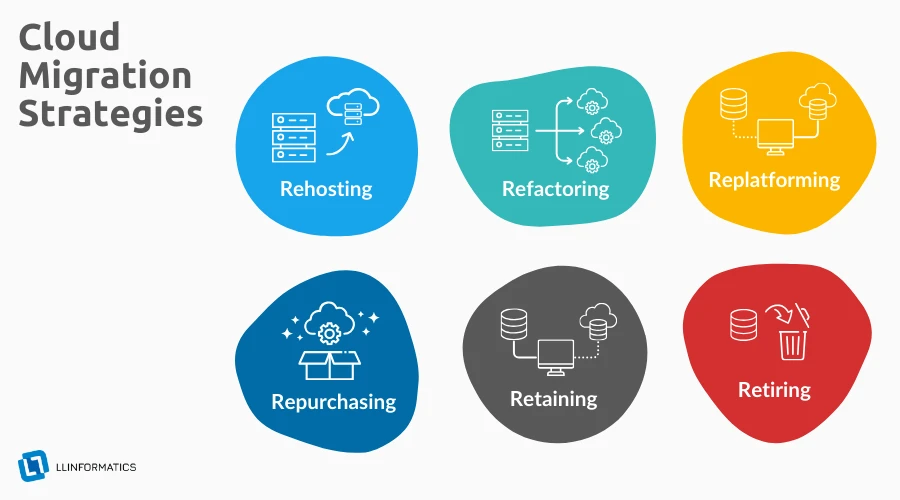
Here are the leading cloud migration strategies, illustrated with examples.
The most common cloud migration strategies: rehosting, refactoring, replatforming, repurchasing, retaining, and retiring
Rehosting (Lift-and-Shift)
Think of rehosting as relocating your applications to the cloud infrastructure with minimal alterations. It’s the digital equivalent of moving homes. It is ideal for rapid migrations but doesn’t optimize the new environment’s cloud-native features.
Refactoring a.k.a. Re-architecting
Here, the move to the cloud involves optimizing your application’s architecture and tapping into the cloud’s vast array of services and capabilities. It’s a deeper, more intensive approach but yields higher benefits.
Replatforming
In this case, you’re modernizing without rebuilding, just tweaking or upgrading your application rather than making core changes. It’s a balance between rehosting and refactoring.
Repurchasing
Sometimes, it makes sense to incorporate a plug-and-play solution that’s already set up on the cloud, leveraging SaaS platforms for operational functions. It can limit future expansion of applications, though.
Retaining
Not all legacy systems need immediate migration. In some complex cases, it might be worth staying on-premises while devising a suitable migration strategy even after deciding to migrate.
Retiring
Decommissioning deprecated, unused, bloated, or redundant systems during migration will reduce costs and streamline operations.
Cloud migration challenges
Data security and compliance: The migration process exposes data to potential vulnerabilities. Businesses can ensure data sanctity by implementing encryption and internal security policies and ensuring GDPR or other regional compliance.
Downtime and service interruptions: Downtime can harm businesses. A phased migration approach and robust rollback mechanisms can mitigate these risks and ensure successful cloud migration.
Cost management: From data transfer charges to unforeseen licensing costs, transparent budgeting and leveraging tools like AWS Cost Explorer or Azure Cost Management can provide financial clarity. Remember, you can save even more by paying upfront fees. Such an approach can help you save up to 70% of infrastructure costs. You can save even more if you support non-production grade environments (dev, test, etc.) and can afford stopovers. With spot instances, your fees might be peanuts, but it will be a sane choice only if you perform jobs that might be abruptly stopped.
Version compatibility: Sometimes systems are not 100% compatible with each other. Remember to always do your homework and check if your services will talk to each other. Also, there’s an approach that tends not to use the most recent version but the previous one. Who said the most current one will not have any bugs or holes incorporated by an accident?
Best practices for cloud migration
Comprehensive assessment and planning: Start with a meticulous audit. Understand interdependencies, identify potential roadblocks, and craft a tailored migration blueprint.
Upskilling and training: Equip your team with the skills of tomorrow. Consider certifications like AWS Cloud Practitioner or Microsoft Certified: Azure Fundamentals.
Continuous monitoring and optimization: Migrating isn’t the endpoint. Utilise tools like Amazon CloudWatch or Google Cloud Monitoring to continuously refine and enhance your cloud platform. You can also use external tools such as NewRelic or Zabbix.
Rollback strategy: Even the best plan might fail. Always remember to be prepared to go back to the previous setup. You never know when and why things might go sideways.
Do not optimize too quickly: You might be tempted to use all of the available services of your cloud provider but do you really need it? Sometimes the best way is to create a Proof of Concept that will be expandable instead of creating a complicated state-of-the-art system in the first place.
Future-proof your business with cloud migration
Transitioning from legacy systems to the cloud isn’t just an IT strategy; it’s a forward-looking business strategy. As modern enterprises sail into the digital horizon, the cloud is their North Star, guiding them towards innovation, resilience, and growth.
Cloud migration refers to moving data, applications, and other business elements from on-premises infrastructure to a cloud computing environment. It is done to leverage the benefits of the cloud, including scalability, flexibility, and cost-effectiveness.
Modernizing legacy systems through cloud migration offers several advantages, such as improved performance, enhanced security, scalability, and cost savings. It allows organizations to keep up with technological advancements and better meet the demands of today’s dynamic business environment.
Common cloud migration strategies include the “Rehost” (lift and shift), “Replatform” (lift, tinker, and shift), “Refactor” (rearchitect), and “Rebuild” (replace) strategies. The choice depends on factors such as budget, time constraints, and the desired level of system optimization. Shorty, the best cloud migration strategy is the one fitted to your business operations.
Choosing the right cloud migration plan requires careful consideration of your organization’s goals, existing infrastructure, and the nature of your applications and data. Here are vital steps to help you choose the most suitable cloud migration plan:
1. Assess current environment:
Conduct a thorough assessment of your existing applications, data, and infrastructure. Understand their dependencies, performance requirements, and security considerations. Identify which workloads are suitable for the cloud.
2. Define business objectives:
Clearly articulate the reasons for migrating to the cloud. Identify specific business objectives such as cost reduction, scalability, agility, improved performance, or a combination.
3. Classify applications:
Categorize your applications based on their criticality, complexity, and compatibility with cloud environments. This classification will help you prioritize migration efforts and determine the most suitable migration approach for each application.
4. Consider cloud service models:
Decide on the appropriate cloud service model for your applications:
IaaS (Infrastructure as a Service): Provides virtualized computing resources.
PaaS (Platform as a Service): Offers a platform with development and deployment tools.
SaaS (Software as a Service): Delivers software applications online.
5. Choose a deployment model:
Select a cloud deployment model that aligns with your organization's needs:
Public Cloud: Services are provided by third-party cloud providers.
Private Cloud: Resources are dedicated to a single organization.
Hybrid Cloud: Combines public and private cloud resources.
Multi-Cloud: Involves using services from multiple cloud providers.
Research and choose a cloud provider before creating a migration strategy.
6. Evaluate migration strategies:
Different applications may require different migration strategies. Common strategies include:
Rehosting (Lift and Shift): Move applications without significant changes.
Replatforming (Lift, Tinker, and Shift): Make some optimizations for the cloud platform.
Refactoring (Re-architecting): Redesign applications to take full advantage of cloud capabilities.
Rearchitecting (Rebuilding): Completely rebuild applications using cloud-native architectures.
7. Consider data migration:
Evaluate the best approach for migrating data to the cloud. Options include bulk transfer, streaming, or using a hybrid system. Ensure data integrity and minimize downtime during migration.
8. Address security and compliance:
Consider security implications and compliance requirements. Choose a migration plan that incorporates security measures and ensures adherence to regulations.
9. Evaluate costs:
Assess the costs associated with each migration strategy. Consider factors such as initial migration costs, ongoing operational expenses, and potential cost savings in the cloud.
10. Assess skill set and resources:
Consider the skill set of your IT team. Choose a migration plan that aligns with your team’s expertise or invest in training as needed. Assess the availability of resources for planning and execution.
11. Pilot and test:
Conduct a pilot migration for a non-critical workload to test the chosen migration plan. Evaluate the results and use lessons learned to refine the plan for broader application.
12. Plan for continuous improvement:
Choose a migration plan that allows for continuous improvement. Implement ongoing optimization, monitoring, and adjustment processes based on changing business needs.
13. Seek expert guidance:
If needed, consider consulting with cloud migration experts or leveraging the support and services provided by cloud vendors. Expert guidance can help ensure a smooth and successful migration.
14. Document and communicate:
Document the chosen migration plan, including timelines, milestones, and responsibilities. Communicate the plan to all relevant stakeholders to ensure alignment and understanding.
By carefully considering these factors, you can choose a cloud migration plan that aligns with your organization’s goals, minimizes risks, and maximizes the benefits of transitioning to the cloud.
Here are the top 10 cloud migration strategy best practices. Remember that the cloud computing landscape is dynamic, so staying updated on industry trends and practices is essential. For 2024, these best practices are likely to remain relevant:
1. Define clear objectives and goals:
Clearly articulate the reasons for migrating to the cloud, whether it’s cost savings, scalability, agility, or other business objectives. Establish specific, measurable, achievable, relevant, and time-bound (SMART) goals.
2. Conduct a comprehensive assessment:
Perform a thorough assessment of existing applications, data, and infrastructure to identify dependencies, performance requirements, security considerations, and compliance needs. Work with potential cloud provider to assess the possible risks properly.
3. Prioritize workloads:
Prioritize applications and workloads based on business criticality, complexity, and ease of migration. Consider starting with less complex workloads to gain experience before tackling more critical systems.
4. Select the right cloud service model:
Choose the appropriate cloud service model (IaaS, PaaS, or SaaS) based on your application requirements and business goals. Some applications may benefit from a combination of these models.
5. Ensure security and compliance:
Integrate security measures into every stage of the migration process. Implement best practices for data encryption, access controls, and compliance with industry regulations. Regularly audit and update security protocols.
6. Implement a robust data migration strategy:
Develop a comprehensive plan for migrating data to the cloud. Consider factors like data transfer speed, integrity, and the impact on production systems. Use tools and practices that minimize downtime and data loss.
7. Establish a cloud governance framework:
Define governance policies and procedures to ensure consistent management, compliance, and security across the cloud environment. This includes roles and responsibilities, resource tagging, and budget management.
8. Optimize for cost and performance:
Continuously monitor and optimize cloud resources to ensure cost-effectiveness and performance. Leverage tools for cost analysis and implement scaling policies to match resource usage with demand.
9. Enable continuous monitoring and automation:
Implement real-time monitoring solutions to track performance, security, and compliance metrics—leverage automation for resource provisioning, configuration management, and scaling to enhance efficiency and responsiveness.
10. Invest in employee training and change management:
Provide training to IT teams and other relevant stakeholders to ensure they have the skills and knowledge needed to operate in the cloud environment. Implement change management practices to address cultural and organizational shifts associated with cloud adoption.
Remember, successful cloud migration is an ongoing process that requires regular evaluation, optimization, and adaptation to evolving business needs and technological advancements. Stay informed about the latest cloud technologies and best practices to ensure a smooth and successful migration in 2023 and beyond.
Whether you are considering moving your data to the cloud, choosing a cloud platform, or optimizing existing cloud resources, you need the right strategy to reap all the cloud's benefits and overcome common cloud migration challenges.
Migrating to the cloud can be costly without proper implementation plans. The cloud migration strategy will guide you through the process of moving your data assets to a cloud environment, including choosing a cloud provider, a cloud migration plan, and the elements of minimizing risk, securing ROI, and ensuring sensitive data safety.
It also covers key factors to consider so that you can optimize existing cloud environments to reduce costs, increase performance, and address technical debt.
Measuring the success of a cloud migration process is crucial for organizations to ensure they achieve their goals and maximize the benefits of cloud adoption. Here are several key performance indicators (KPIs) and metrics that organizations can use to assess the success of their cloud migration:
1. Cost savings:
Total Cost of Ownership (TCO): Compare the overall costs before and after cloud migration, including hardware, software, and operational expenses.
2. Performance and scalability:
Response time and latency: Measure the application’s responsiveness and latency in the cloud compared to the on-premises environment.
Scalability: Assess the ability to scale resources up or down based on demand.
3. Reliability and availability:
Uptime and downtime: Measure the system’s availability in the cloud and compare it to the on-premises environment.
Fault tolerance: Evaluate the system’s ability to recover from failures without affecting overall performance.
4. Security and compliance:
Security incidents: Monitor the number and severity of security incidents post-migration.
Compliance: Ensure that the cloud environment meets regulatory and compliance requirements.
5. Operational efficiency:
Automation: Measure the degree of automation in managing and provisioning resources.
Operational efficiency metrics: Track the time to deploy new features or updates.
6. User Experience:
User satisfaction: Collect feedback from end-users on their experience with applications post-migration.
7. Data management:
Data transfer speed: Assess the data transfer speed to and from the cloud.
Data integrity and availability: Ensure data integrity and availability in the cloud environment.
8. Adoption of a cloud:
Utilization of cloud services: Monitor the usage of different cloud providers' services and features.
Service Level Agreement (SLA) compliance: Evaluate if cloud providers meet SLA commitments.
9. Flexibility and agility:
Time to market: Measure the time to launch new products or features.
Agility in resource provisioning: Evaluate how quickly resources can be provisioned or de-provisioned.
10. Training and skill development:
Employee training: Assess whether employees have acquired the necessary skills for managing cloud resources.
11. Environmental impact:
Energy efficiency: Consider the cloud infrastructure's environmental impact and energy efficiency.
12. Business metrics:
Revenue growth: Evaluate any impact on revenue and business growth.
Return on Investment (ROI): Assess the overall return on investment from the cloud migration.
13. Migration time and complexity:
Downtime during migration: Measure the downtime experienced during the migration process.
Complexity of migration: Evaluate the complexity of the cloud migration strategy.
By tracking these metrics, organizations can gain insights into the success of their cloud migration efforts and make informed decisions to optimize their cloud environments for better performance and efficiency. Regularly reviewing and adjusting strategies based on these metrics is essential for continuous improvement in the cloud environment.
Remember, a successful cloud migration strategy requires careful planning, proper migration tools, stakeholder involvement, and a thorough understanding of the organization’s goals and constraints. Continually adapt your approach based on the specific needs and characteristics of your legacy systems and business environment. Remember to work with cloud service providers over time to get the most from the cloud migration.


%203fs.png)



%202.png)